
Quick answer: To build a placement list for display ads, understand your audience, find websites through keyword and competitor research, filter them by traffic, relevance and country, then add them under Content → Placements in Google Ads. Start small and remove placements that spend without results.
When you run a Google Display campaign, you can let Google choose where to show your ads, or you can choose specific websites yourself. These chosen websites are called placements. Placements give you specific targets. In this post, I explain the process I use to build a list of placement websites.
As an example, let us take a home interiors brand that sells modular kitchens and home décor.
Step 1: Understand your audience
Identify the characteristics, interests and behaviours of your target audience. For a home interiors brand, the audience may be people who have bought a new flat, are planning a renovation, or follow home décor ideas online.
Step 2: Find possible websites
Use more than one source:
- Keyword research. Find keywords related to home décor, interior design and furniture. Search them and note the blogs, portals and communities that appear.
- Competitor research. Check where competitors or similar brands get traffic and backlinks. Tools such as Semrush or Similarweb help here. Read How to check the backlink profile of a website.
- Industry platforms. Look for industry-specific platforms, forums and publications related to home design.
- Google Ads itself. While setting up the campaign, you can search by word or phrase and Google suggests websites, YouTube channels and apps.
Step 3: Filter the list at two levels
Do not add every website you find. Check each one at two levels:
- Traffic. What is the general traffic of the website? A site with very little traffic will not give you enough impressions.
- Relevance. Is this traffic relevant? Does your customer spend time on this website? Does the content match your brand’s message?
Also check the country. If your business is in India, check whether the website’s audience is mainly in India.
Step 4: Check that the site shows display ads
Your placement must be part of the Google Display Network. If a website does not show Google ads, your ad cannot appear there.
Step 5: Add placements in Google Ads
- Log in to your Google Ads account.
- Click + Campaign (or Create → Campaign) and choose your goal, for example Sales, Leads or Website traffic.
- Select Display as the campaign type.
- Name your campaign and choose locations and languages.
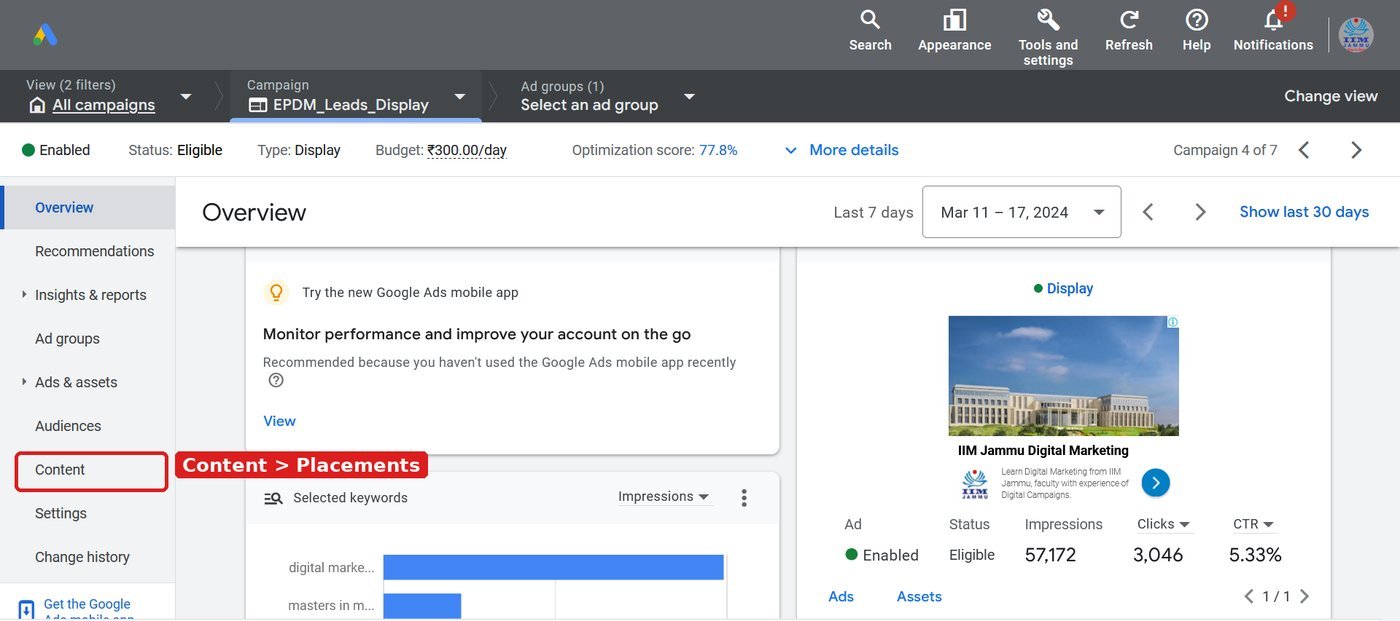
- In the ad group targeting, open Content → Placements.
- Choose Websites and paste the URLs from your list. You can also add YouTube channels or apps.
- Save and continue to budget and ads.
Menu names in Google Ads change from time to time. If you do not see the same words, look for “Placements” in the targeting section.
Step 6: Test and optimise
Start with a few placements, not hundreds. After the campaign runs, check the report that shows where your ads were shown. Keep the websites that give clicks and conversions at a good cost. Exclude the ones that only spend money.
Quick checklist
| Check | Question to ask |
|---|---|
| Audience fit | Does my customer visit this website? |
| Traffic | Is the traffic large enough? |
| Country | Is the audience in my target market? |
| Content fit | Does the content suit my brand? |
| Ad availability | Is it part of the Google Display Network? |
| Results | After launch, is it giving conversions at a good cost? |
Next, read Step by step approach to designing Google Display ads and Google Display ad sizes.
Worked example: a simple placement sheet
Keep your list in a sheet like this before you add it to Google Ads.
| Website | Found through | Monthly traffic (approx.) | Audience in India? | Relevant? | Shows Google ads? | Decision |
|---|---|---|---|---|---|---|
| Home décor blog A | Keyword search | High | Yes | Yes | Yes | Add |
| Interior design forum B | Competitor backlinks | Medium | Yes | Yes | Yes | Add |
| News portal C (home section) | Google Ads suggestion | Very high | Yes | Partly | Yes | Test |
| Global décor site D | Semrush | High | No | Yes | Yes | Skip |
Try it yourself
- Choose one product you want to advertise and write 5 keywords for it.
- Find 15 websites using keyword search, competitor backlinks and the Google Ads suggestions.
- Fill the placement sheet above for each website and mark Add, Test or Skip.
- Create a display campaign with only the “Add” websites and a small daily budget.
- After 7 days, open the “Where ads showed” report and exclude websites with spend but no clicks or leads.
Common mistakes to avoid
- Adding hundreds of placements at once, so you cannot see what works.
- Choosing websites only for high traffic, not for relevance.
- Forgetting to check the country of the audience.
- Never checking the placement report after launch.
Frequently asked questions
What are placements in Google Ads?
Placements are the specific websites, YouTube channels, videos or apps where you choose to show your display or video ads.
How many placements should I start with?
Start with 10 to 20 well-checked websites so you can see which ones work, then expand.