
Sitelinks are links from the same domain that are clustered together under a text result. When you search for a brand name, you often see the main result and, below it, 4 to 6 extra links such as “About”, “Courses” or “Contact”. These are organic sitelinks.
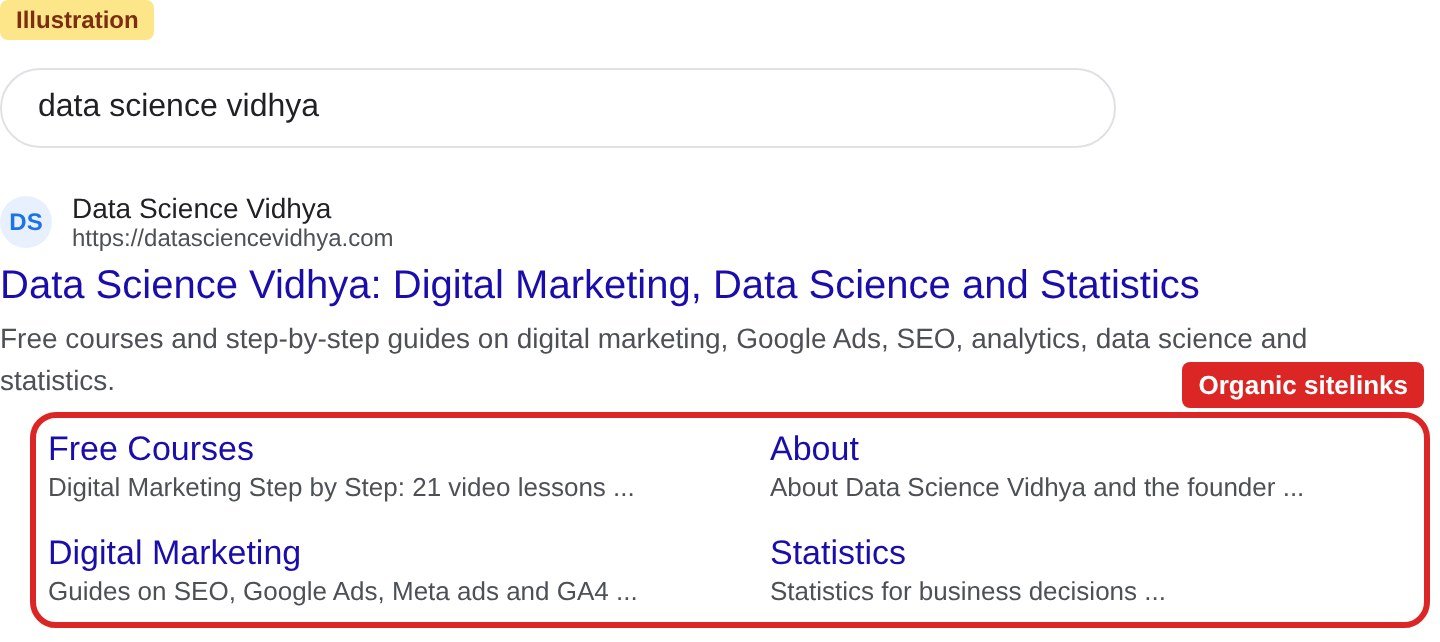
Why sitelinks matter
- More space on the results page. Your result takes more room, so it is easier to notice.
- Faster path for the user. The user can go straight to the page they want, without landing on the home page first.
- More trust. Sitelinks usually show for well-structured sites, so the result looks more complete.
Can you add sitelinks yourself?
No. Organic sitelinks are automated. Google looks at the link structure of your website and picks the shortcuts it thinks will help users. Google shows them only when they are useful for that search. If your site structure does not give good options, Google will not show them.
Do not confuse these with sitelink assets in Google Ads. In a paid search ad, you choose the sitelinks yourself. Read more in Different ad extensions (assets) in Google Search Ads.
How to earn organic sitelinks
You cannot force sitelinks, but you can make your site easy for Google to understand.
- Write clear page titles and headings. Each page title should say what the page is about, in a few words. Read How to add a title tag to a WordPress website.
- Build a logical site structure. Keep your main sections in the header menu. Link important pages from other relevant pages.
- Use short and relevant anchor text. When you link to a page, use words that describe that page. Avoid “click here”.
- Avoid repeated content. If two pages say the same thing, Google finds it hard to choose one.
- Submit an XML sitemap. It helps Google find all your important pages. Read How to create an XML sitemap and submit it to Google Search Console.
- Build brand searches. Sitelinks show mostly for searches on your brand or website name. The more people search for your brand, the more chances you get.
How to remove a sitelink you do not want
If Google shows a page you do not want as a sitelink, you can remove that page or add a noindex tag to it. Google will then stop showing it in search results.
Quick summary
| Question | Answer |
|---|---|
| What are organic sitelinks? | Extra links from your site shown under your main search result |
| Who decides them? | Google, automatically |
| Can I add them? | No. In Google Ads you can add sitelink assets, but that is paid search |
| How do I improve my chances? | Clear titles, logical structure, good internal links, no repeated content |
Try it yourself
- Search your own brand or website name on Google. Note whether sitelinks appear and which pages they point to.
- Open your header menu. Check that your 4 to 6 most important pages are linked there with short, clear names.
- Open Google Search Console, go to Indexing → Sitemaps and check that your sitemap status is “Success”.
- Pick one important page. Add 2 or 3 links to it from other related posts, using clear anchor text.
- Repeat the brand search after 4 to 6 weeks and compare.
Common mistakes to avoid
- Using vague page titles such as “Home” or “Page 1”.
- Hiding important pages deep in the site with no menu or internal links.
- Creating many near-duplicate pages on the same topic.
- Expecting sitelinks for generic searches. They show mostly for brand searches.
Frequently asked questions
What is the difference between organic sitelinks and sitelink assets?
Organic sitelinks are chosen automatically by Google in normal search results. Sitelink assets are added by you in Google Ads and appear only with paid ads.
How long does it take to get sitelinks?
There is no fixed time. Sites with a clear structure and regular brand searches usually start to see them as they grow.
Can I choose which pages show as sitelinks?
No, but you can stop a page from showing by removing it or adding a noindex tag.
Sources: Google Search Central: Sitelinks